
Business Advice
AI in Accounting & Finance: Definition, Examples & Applications
From automating tasks to improving decision-making, explore how AI-powered tools can save time, reduce errors, and enhance your financial processes.
AI can extract receipt data, suggest an expense category, and flag a claim that may need a second look. But that doesn’t mean finance should hand over every decision.
AI expense management uses artificial intelligence to handle repetitive parts of expense processing, helping finance teams spend less time on routine checks and more time on the exceptions that need judgement.
Deloitte’s 2027 survey of 1,434 finance leaders found that while 95% were comfortable with agentic AI in at least some finance activities, only 14% supported full autonomy for critical decisions.
So for finance teams, then, the question isn’t simply “does it use AI?” It’s what should AI handle, what should people review, and how do you keep control of the process?
AI expense management means applying artificial intelligence to parts of the expense process that would otherwise involve repetitive manual work or interpretation.
Depending on the expense software, AI can help:
extract information from receipts and invoices
suggest expense categories
compare receipts with submitted claims
identify potential duplicates or inconsistencies
highlight spend that may need policy review
direct approvers towards claims that need closer attention
The exact capabilities vary between products.
And it’s worth separating AI from ordinary expense automation.
A workflow that sends every claim over £500 to a second approver is automation. A system that reads an uploaded receipt and interprets information from it may use AI.
Both can save time. But they solve different problems.
Understanding that distinction makes it easier to assess what an “AI-powered” expense platform is actually offering.
For most finance teams, the best use of AI is not replacing an entire process. It’s removing repetitive checks from specific points within it.
Expense task | Where AI or automation can help | What finance still needs to control |
|---|---|---|
Extract information from submitted documents | Review incomplete or incorrect data | |
Categorisation | Suggest an appropriate expense category | Confirm treatment where business context matters |
Flag possible mismatches, duplicates or restricted spend | Decide whether a flagged issue needs action | |
Surface claims that may fall outside configured rules | Define policy and judge legitimate exceptions | |
Send claims through configured workflows | Decide approval limits, roles and exceptions | |
Help match expense information with transactions | Review exceptions and confirm accounting treatment |
AI is most useful when it moves finance away from checking every routine detail and towards reviewing the things that genuinely need attention.
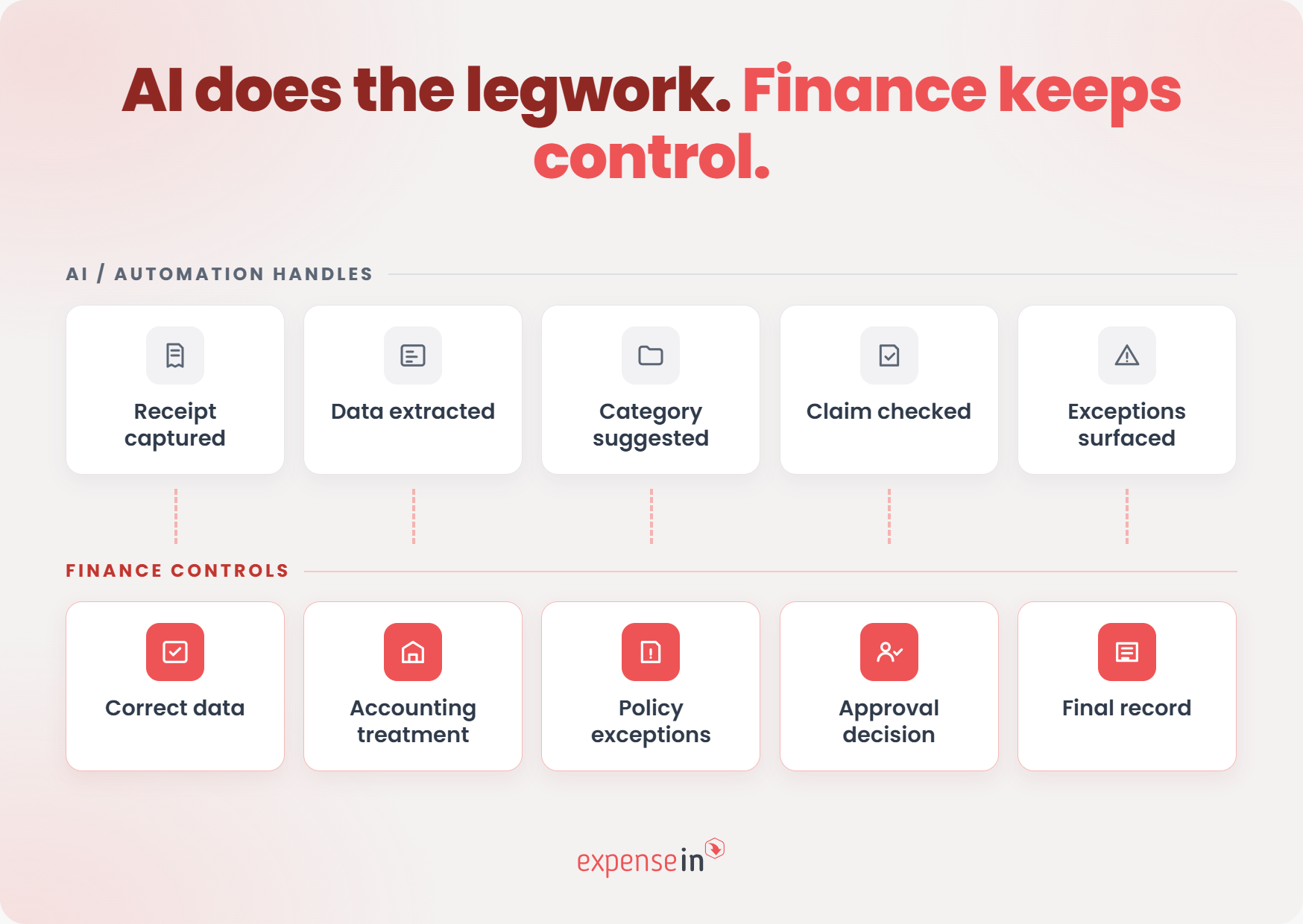 Receipt and invoice capture
Someone still has to turn a receipt or invoice into usable finance data.
AI-powered document processing can extract fields such as the supplier, date, and amount instead of asking someone to type them in manually. The value becomes particularly obvious when documents arrive in different formats.
A real-world example: Microsoft’s case study on Concentrix describes how the company processes more than 100,000 utility invoices a month from over 100 providers and across more than 300 document layouts, using OCR and AI models to extract and standardise the information. Exceptions can still be reviewed against the original document.
That last step matters for expenses too.
A folded receipt, poor-quality image, or unfamiliar layout can still produce an incorrect result. The goal should be to remove unnecessary data entry while keeping the source document and extracted information easy to compare and correct.
Knowing that someone spent £120 at a restaurant is not necessarily enough to know how the expense should be treated.
AI can use the merchant, receipt contents, and other available information to suggest a category. But the business context can change the answer.
Take meals as an example. HMRC’s VAT guidance distinguishes between subsistence for an employee travelling on business and entertainment provided to clients or other non-employees. The VAT treatment can differ depending on who was being entertained and why the cost was incurred.
So a restaurant receipt can’t always be safely categorised from the merchant name or amount alone.
AI can make the first suggestion. Finance still needs the context to determine whether that suggestion is right.
This is where automation can take a lot of repetitive checking out of the approval queue.
A system can compare information across the receipt, claim, and configured rules to surface potential issues such as:
amounts that do not match supporting evidence
possible duplicate claims
missing or inconsistent information
spend that may require further policy review
Duplicate checking is a good example of why this matters.
For example, where an employee has charged an incidental expense to their hotel bill and then also received an allowance covering the same cost.
HMRC’s newer guidance on employee-expense controls also recommends controls that detect and query duplicate entries, and notes that computer-aided checks can provide greater assurance than relying on sampling alone.
The point is that finance shouldn’t have to manually compare every routine claim just to find the few that deserve a closer look.
Human oversight only works if the reviewer can genuinely challenge the system.
The ICO’s guidance on AI-assisted decision-making puts it clearly:
“Reviewers’ involvement must be active and not just a token gesture.”
It also says reviewers should have the “authority and competence” to go against the recommendation.
Expense claims are a good example of why:
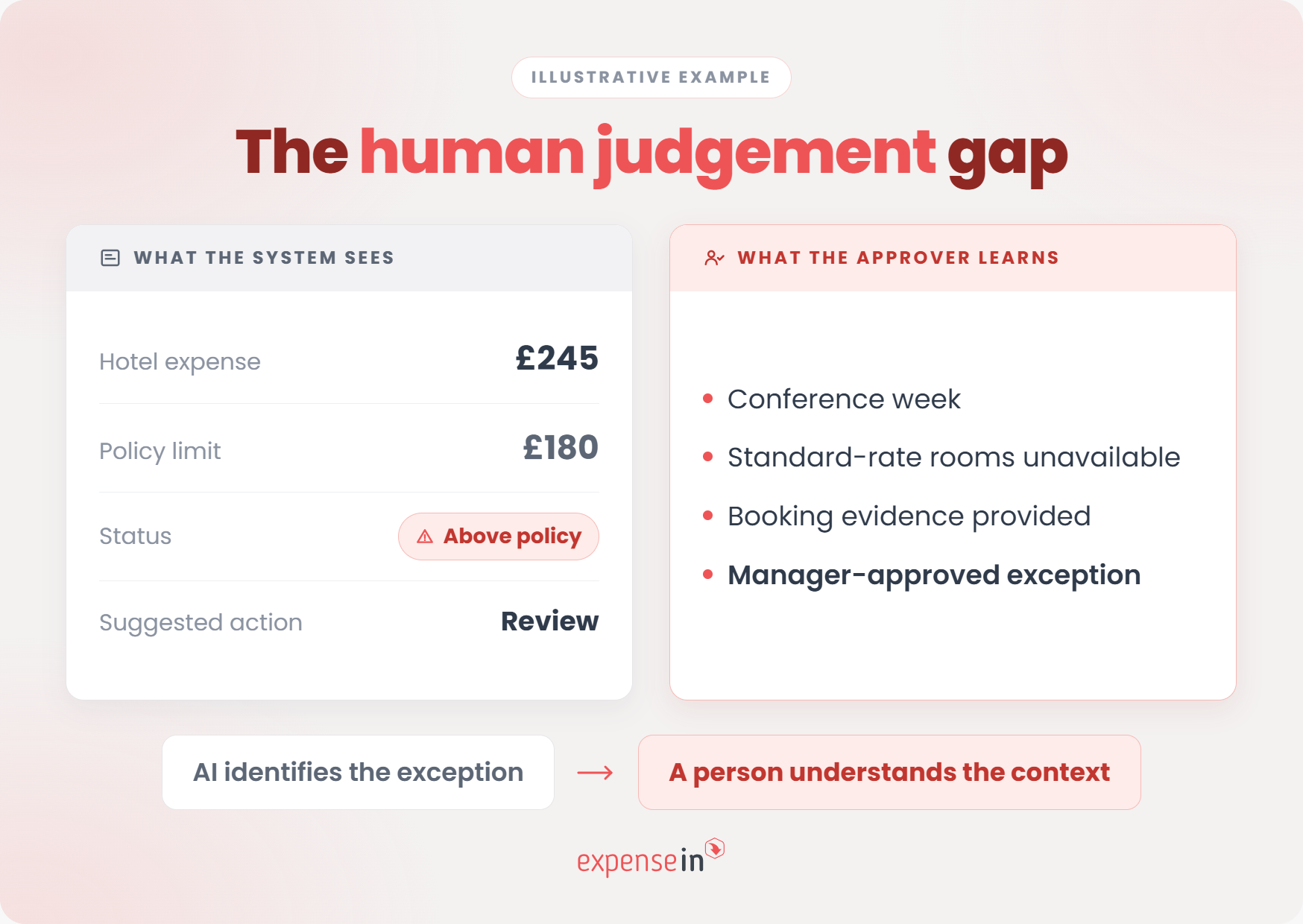
A hotel bill above policy may be an exception worth challenging, or a completely reasonable cost caused by limited availability.
UK government travel guidance reflects that reality: it sets hotel-cost ceilings but allows managers to approve amounts outside them where evidence shows the standard limit is inappropriate.
The system can flag the rule. A person still has to understand the circumstances.
That matters because people can also become too reliant on automated recommendations. The ICO identifies “automation bias” as a risk when reviewers stop applying their own judgement to AI outputs.
 Clear policy comes before clever automation
AI also needs clear rules to work within.
The Charity Commission’s guidance on financial controls recommends that an expenses policy defines what can be claimed, what evidence is required, when prior permission is needed and how claims are approved.
Before automating your own process, be equally clear about:
which expenses require evidence
where limits apply
what counts as an exception
who can approve one
which decisions require human judgement
AI can apply and surface rules. Finance still needs to own the policy and the exceptions to it.
A convincing demo tells you what the AI can do.
A good finance review goes further: how well can you understand it, monitor it, and hold someone accountable when something changes?
In the Bank of England and FCA’s 2024 survey of AI in UK financial services, only 34% of firms said they had a “complete understanding” of the AI technologies they used, while 46% reported only a “partial understanding”.
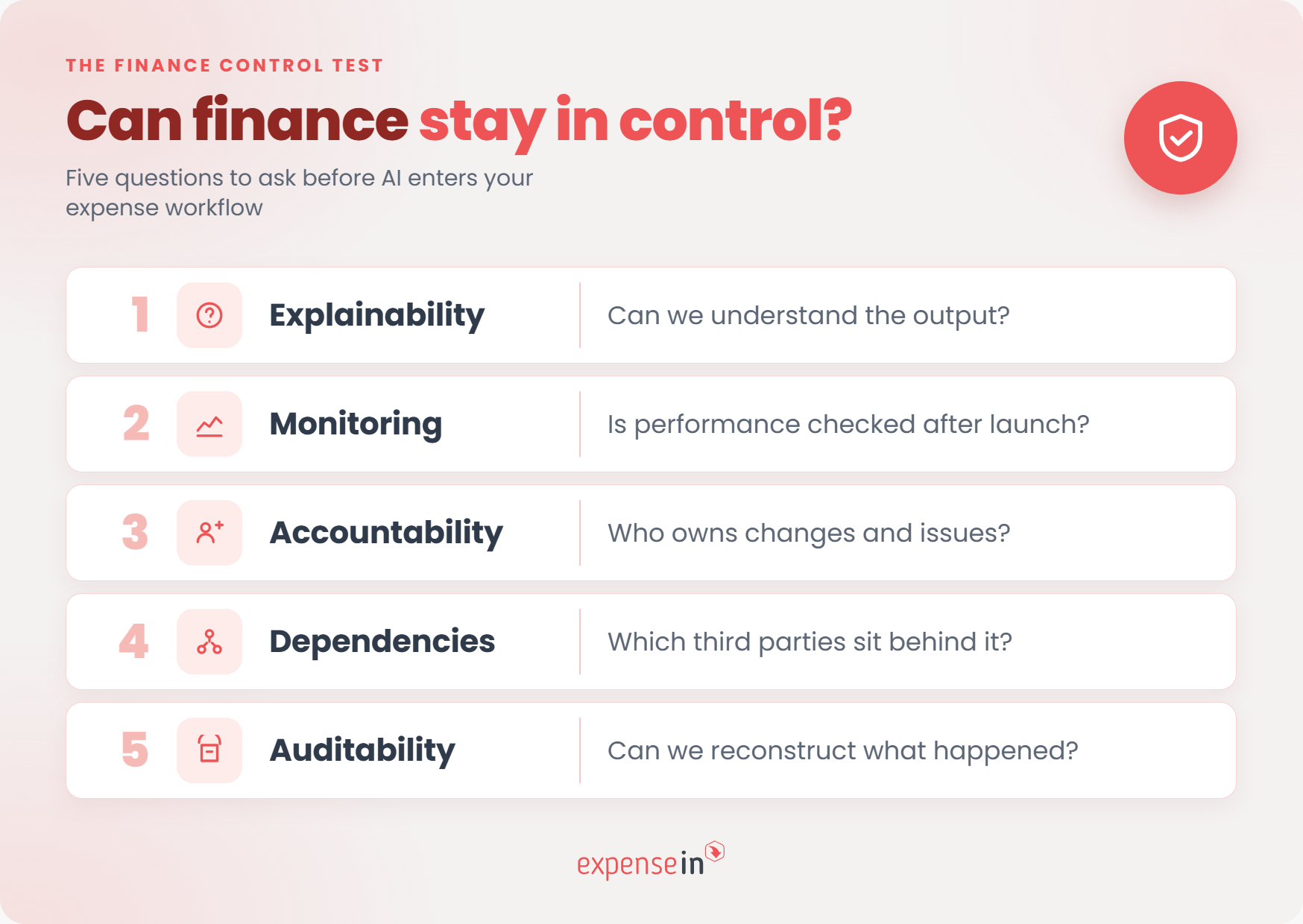 So, before adding AI to your expense process, ask these five questions:
You don’t need every approver to understand the underlying model.
But finance should be able to understand enough to assess the result.
If an expense is categorised a certain way or marked as unusual, can you see which information contributed to that outcome? Can your team distinguish between something generated by AI, something triggered by a fixed rule, and something entered by an employee?
That level of transparency is already a priority in financial services. The same Bank of England and FCA survey found that 81% of firms using AI employ some form of explainability method.
For an expense system, the practical test is simpler: can finance understand enough about an output to investigate it when something looks wrong?
A successful implementation test is only a snapshot.
Suppliers change receipt formats. Policies change. New types of spend appear. The system itself may also be updated.
So ask how performance is monitored once the AI is being used day to day.
The Bank of England and FCA found that 88% of surveyed firms using AI monitored measures such as accuracy, precision, recall and sensitivity, while 72% monitored model robustness and stability.
You don’t necessarily need those exact measures for every expense feature. But you should know:
how the vendor checks whether performance is changing
how often that happens
what triggers investigation
whether customers are told about material issues
how corrections or feedback are handled
The UK Government’s AI Playbook makes the same point: AI should be tested before deployment, with “regular checks of the live tool” once it is in use.
AI control is not a one-off implementation task.
Someone should own the AI after the implementation project ends.
That includes responsibility for changes to configurations, policies, workflows, and the AI itself.
Again, this is already visible in UK financial services: 84% of firms in the Bank of England and FCA survey had an accountable person responsible for their AI framework, while 87% reported using change management practices.
For an expense management platform, ask:
who can change AI-related settings
how those changes are controlled
whether previous settings are recorded
who is told when a material feature changes
who inside your organisation owns the resulting process
The expense software you buy may not be the only technology involved.
The vendor may rely on external AI models, cloud infrastructure, document-processing services, or other providers behind the scenes.
That dependency is worth understanding. A third of the AI use cases reported in the Bank of England and FCA’s survey were third-party implementations, and firms expected third-party dependency to become one of the fastest-growing AI risks.
Ask your vendor:
which parts of the AI capability are provided by third parties
what data those providers receive
whether a provider can change without your knowledge
what happens if an underlying service becomes unavailable
who is responsible for resolving an issue
You don’t need to own the technology stack, but you should understand the dependencies behind a finance process you rely on.
An AI-assisted process should leave more than a final answer.
If something goes wrong, finance may need to understand which version of the system was in use, what information it received, what output it produced, and what happened next.
The UK Government’s AI Playbook describes auditability as retaining traceability throughout the AI lifecycle, supported by clear reporting and documentation.
For expense management, that translates into practical questions:
Is the original submission retained?
Can you see the output the system produced at the time?
Are changes and corrections recorded?
Can you identify which rules or settings were in force?
Can relevant records be exported if they are needed for review?
AI expense management still sits inside the UK tax, record-keeping, and data-protection rules your finance team already works with.
So when you assess a system, test how well it supports those requirements, not just how accurately it reads a receipt.
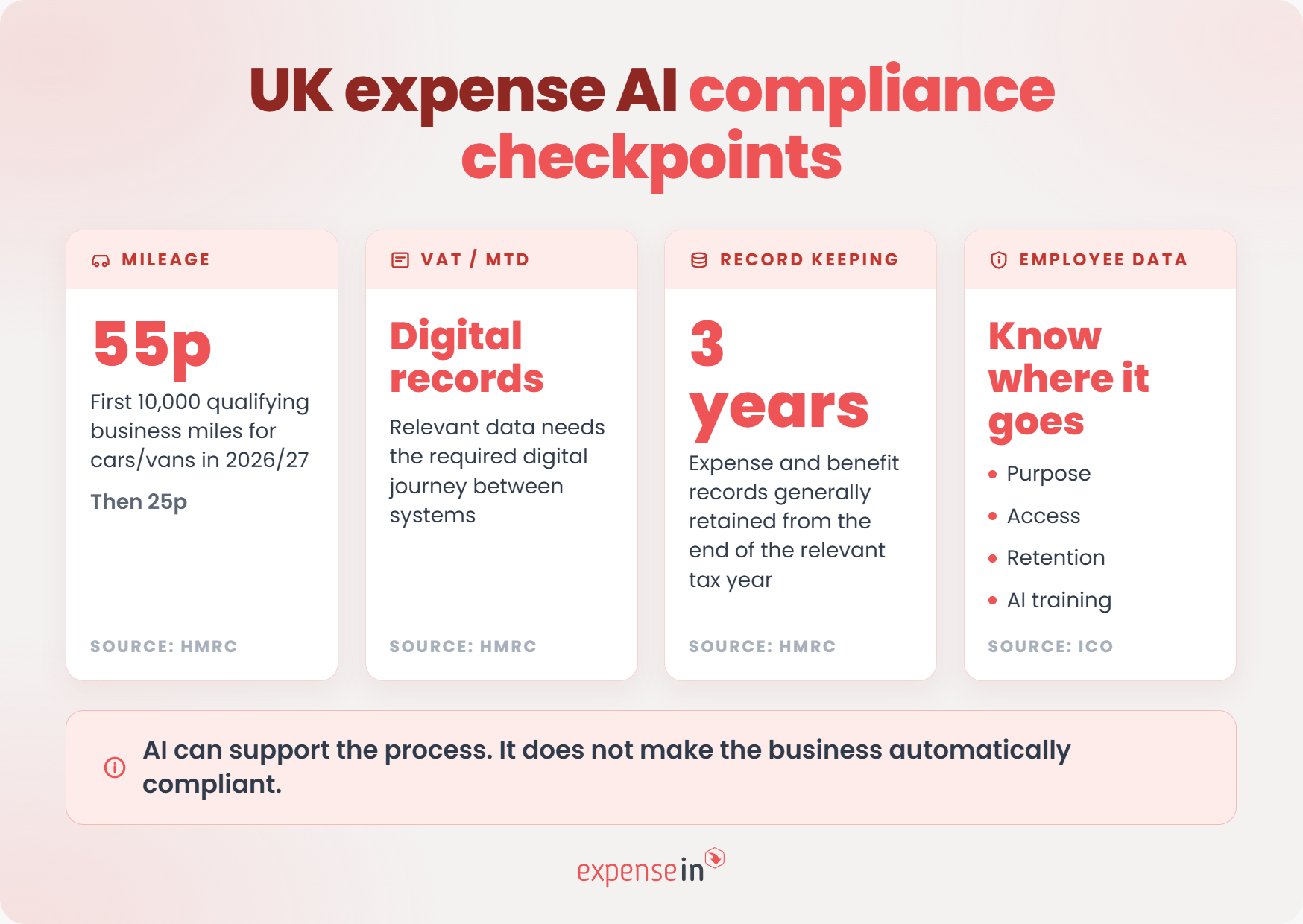 Can it handle your mileage rules accurately?
For 2026/27, HMRC’s Approved Mileage Allowance Payment rates for employees using their own cars or vans are 55p per business mile for the first 10,000 miles, then 25p for each mile after that.
So if an employee drives 12,000 qualifying business miles in their own car, the approved amount would be £5,500 for the first 10,000 miles and £500 for the next 2,000: £6,000 in total.
A system therefore needs to do more than store a single mileage rate. Finance should be able to see how thresholds are applied, how rates are updated, and how each claim has been calculated.
The HMRC rate doesn’t dictate what every employer must reimburse, so check how the software supports your own policy alongside the relevant tax rules.
Making Tax Digital for VAT requires VAT-registered businesses to keep specified records digitally and submit VAT returns using software.
Those records can span multiple systems, but where HMRC requires a digital link, manually copying and pasting information between them doesn't count.
For finance, the practical question is therefore not just whether AI can extract VAT information from a receipt.
It’s what happens to that information next.
If expense data moves from your expense platform into accounting software and ultimately feeds your VAT records, check how that transfer happens, whether corrections are traceable, and whether the supporting evidence remains available.
AI can help capture the data. It should not be treated as an automatic answer to the correct VAT treatment, which can depend on the expense and circumstances involved.
HMRC requires employers to keep records of employee expenses and benefits for three years from the end of the relevant tax year.
That makes the audit trail a useful test of any automated process.
Take a mileage claim from two years ago. Could finance still see:
why the journey took place
how the amount was calculated
what evidence supported it
who approved it
what changed along the way
If answering those questions means piecing together emails, exports, and separate systems, automation has only moved the admin further down the line.
Expense claims can contain names, locations, journeys, and other personal information.
The ICO’s UK GDPR guidance includes principles such as purpose limitation, data minimisation, storage limitation, security, and accountability.
AI adds another question: what is your data being used for?
A business may need to retain an expense record to meet HMRC requirements. That doesn’t automatically mean the same information should be retained or reused for another purpose, such as training an AI model.
So ask vendors:
what personal data the AI processes
where it is stored and processed
whether your data is used to train or improve models
which third parties have access to it
how long it is retained
what happens to it when the contract ends
For specific tax, VAT or data-protection requirements, confirm the position against current HMRC and ICO guidance or with an appropriate adviser.
A good AI rollout should answer three questions before you scale it:
What problem are we solving?
How will we test whether the AI is good enough?
And what happens when it's not?
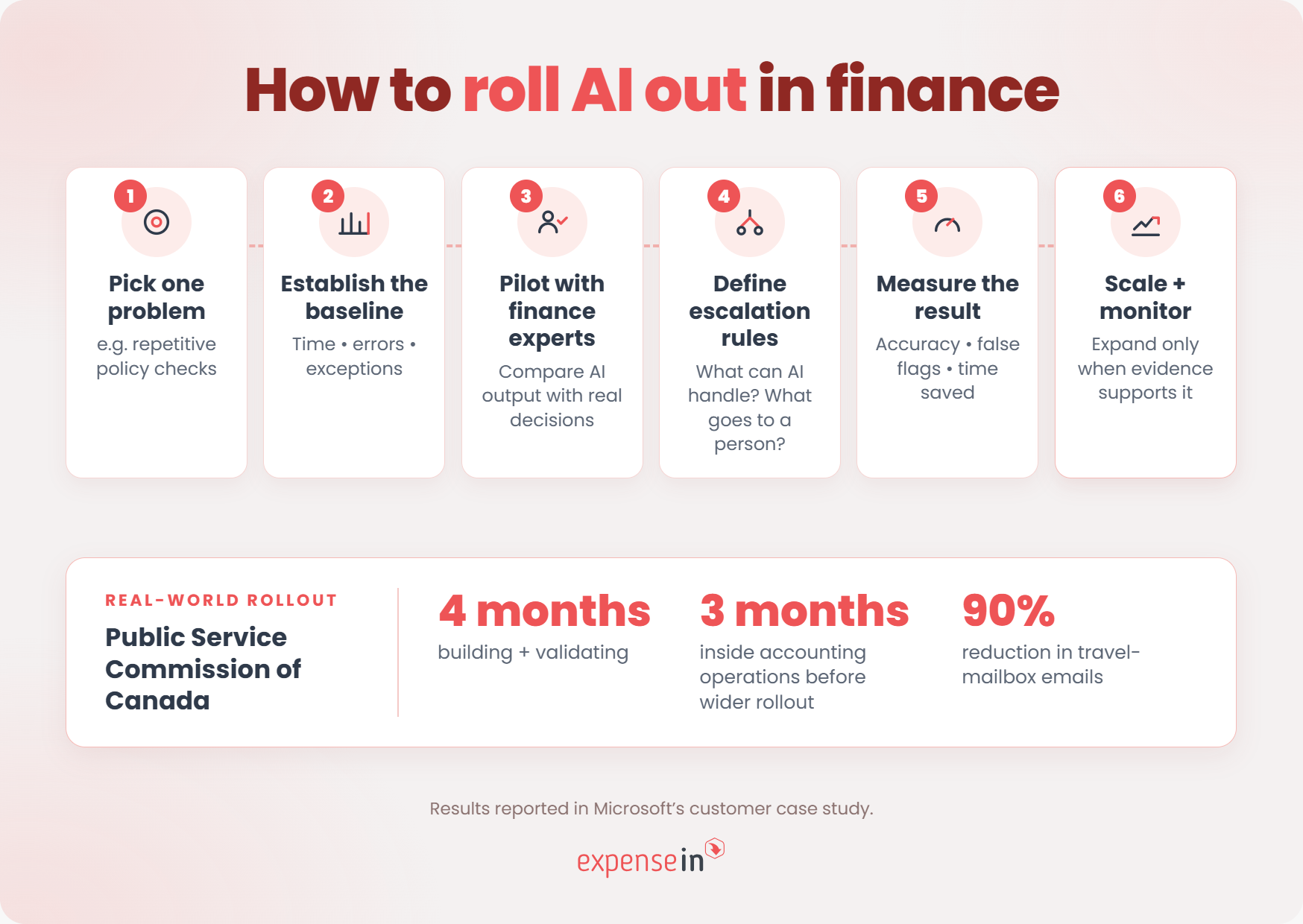
A useful real-world example comes from the Public Service Commission of Canada’s finance team. Its rollout of an AI agent for travel policy queries was deliberately staged rather than launched department-wide from day one.
See the Public Service Commission of Canada case study.
The team didn’t begin with a broad goal to “use AI in finance”.
It identified a specific bottleneck: finance specialists were repeatedly answering routine questions about travel policy, interrupting higher-value work, and slowing down approvals and bookings.
That gave the rollout a clear objective: reduce repetitive policy queries without reducing the accuracy or control behind the answers.
Apply the same thinking to expense management.
Start with one problem you can describe and measure, such as:
too much manual receipt entry
repeated category corrections
large volumes of straightforward policy checks
slow exception handling
missing supporting information
Avoid starting with “we want to automate expenses”. That’s too broad to tell you whether the rollout is working.
The Commission spent four months building and validating its travel AI agent.
It then spent another three months deploying it within accounting operations, where finance officers and subject-matter experts checked its answers before it was released department-wide.
As the case study explains, finance specialists were used to:
“vet the initial output during the pilot phase”
That’s a useful model for an expense rollout.
Before opening an AI feature to the whole organisation, run it against real claims, and compare its output with the decisions your team would normally make.
Test both routine and awkward cases:
clear and poor-quality receipts
familiar and unusual suppliers
straightforward and borderline policy cases
correct and duplicated documentation
normal and unusually high amounts
The point of the pilot is to find the failure modes while the scope is still controlled.
The Commission didn’t expect the agent to answer everything.
It set explicit behavioural boundaries so complex or out-of-scope questions were routed to qualified finance specialists instead of prompting the AI to improvise an answer.
That principle translates directly to expense management.
Before rollout, decide:
what the AI can handle automatically
what it can suggest but not decide
what should trigger human review
what it should refuse or escalate
who owns the escalated case
A useful rollout doesn’t just test when AI works. It defines what should happen when it doesn’t.
Once the Commission had validated the tool inside finance operations, it expanded the agent department-wide.
The reported results were substantial: emails to the travel mailbox fell by 90%, while complex queries that previously took between one and five days could be answered in 1-30 seconds.
Those figures are specific to that organisation, not a benchmark for what every finance team should expect.
But the rollout sequence is useful:
Pick one problem → Establish a baseline → Pilot with finance experts → Define escalation rules → Measure the result → Then expand.
Going live should not mean handing ownership over to the AI.
The Public Service Commission kept subject-matter experts involved and designed the agent to use its maintained policies and guidance as its source of information. Its own 2026-27 departmental plan says it is continuing to explore the AI agent as part of its wider Financial Management Transformation Initiative.
See the Commission’s 2026-27 departmental plan.
For an expense rollout, agree upfront:
who owns the AI-enabled process
which performance measures will be reviewed
how errors and false flags are recorded
what happens when expense policy changes
when the rollout should be adjusted, paused or expanded
The aim is not to switch AI on everywhere as quickly as possible. It’s to prove that it works on a defined finance problem, understand where it needs human support, and scale only when the evidence justifies it.
ExpenseIn takes an assistive AI approach: use AI for the repetitive work, while keeping the output reviewable and the final decisions with your team.
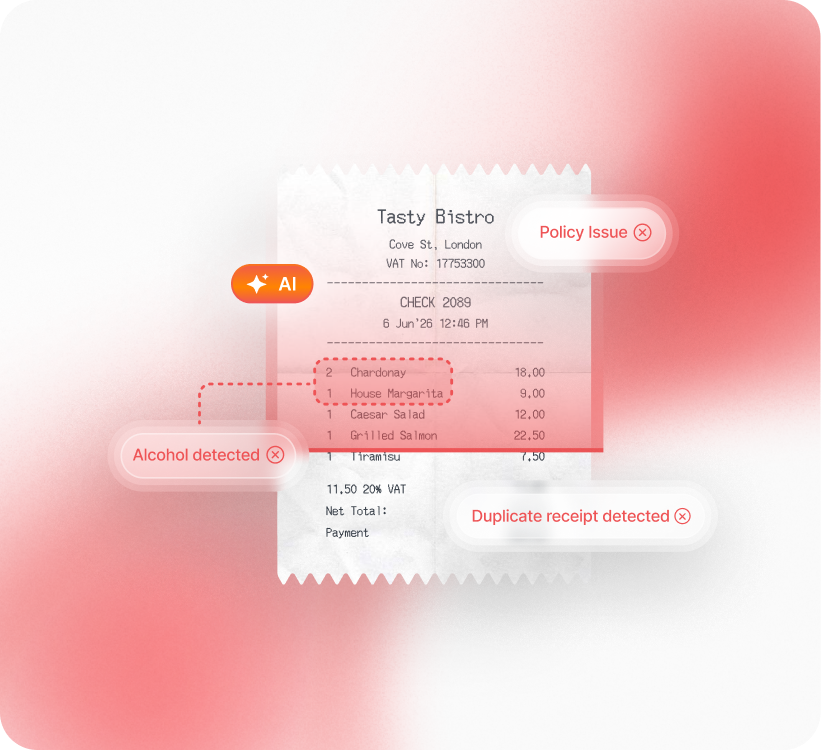 Rather than replacing the expense workflow, AI sits inside the policies, approvals, and checks finance already relies on.
ExpenseIn’s AI approach focuses on three areas:
Document capture: AI extracts information from receipts and invoices so users do not have to enter every field manually. The extracted information is presented for review before it moves through the process.
Categorisation: AI uses information extracted from the receipt or invoice to suggest a category. For expenses, pre-populated information can be reviewed and overridden by the user before the expense is submitted.
Receipt verification: AI-powered checks compare the submitted receipt with the expense claim and policy rules before approval with 98% accuracy. It can flag potential amount mismatches, restricted spend, and receipts that may be duplicated, altered, or AI-generated.
The important part is what happens next.
A receipt verification flag does not approve or reject the expense. Approvers can review the receipt, policy issues, and expense history before making the decision, and the feature does not replace human judgement or final approval.
That is the role ExpenseIn gives AI: capture more of the information, make routine checking easier, and surface potential issues earlier – without removing finance from the decision.
 Is AI expense management worth it?
It can be, but simply adding AI to an expense process doesn't guarantee a better one.
PwC’s 2026 AI Performance Study found that 74% of the economic value attributed to AI was being captured by just 20% of organisations. Those higher-performing organisations were also twice as likely to redesign workflows around AI rather than simply bolt new tools onto existing processes.
For expense management, AI is most likely to earn its place when it creates a measurable improvement, such as:
fewer routine checks for finance and approvers
less manual correction or data entry
earlier identification of claims that need attention
faster handling of straightforward expenses
fewer exceptions reaching finance late in the process
But those gains shouldn’t come at the expense of visibility or control.
If your team saves time but has to investigate more false flags, can’t understand why a claim was handled a certain way, or loses a clear record of the decision, some of that value disappears.
So the test is not how much of the expense process AI can automate.
It’s whether the process becomes quicker to operate, easier to control, and no harder to explain afterwards.
If you can demonstrate that with your own expense data, AI is doing useful work rather than simply adding another layer of technology.
AI expense management uses artificial intelligence to handle or assist with parts of the expense process that normally require manual work or interpretation.
Depending on the software, that can include extracting data from receipts, suggesting expense categories, comparing claims with supporting documents, identifying potential duplicates, and flagging expenses that may need further review.
The aim is to reduce repetitive processing while directing finance teams towards the claims that need more attention.
Automated expense management is the broader term. It includes any part of the expense process that software performs automatically, such as routing a £500+ claim to a second approver based on a fixed rule.
AI expense management uses artificial intelligence where the system needs to interpret information rather than simply follow a predefined instruction. That might mean reading a receipt, suggesting what type of expense it represents or identifying an unusual pattern.
In practice, a good expense process may use both: fixed automation for predictable rules and AI where interpretation is useful.
Yes, some expense systems can automatically approve claims that meet predefined conditions, although the extent of autonomous decision-making varies by product.
The important question is what the AI is allowed to decide and what triggers human review. A business might choose to automate low-risk, routine claims while escalating policy exceptions, unusual amounts or uncertain results to an approver.
For finance teams, the approval boundary should be explicit rather than hidden behind an “AI-powered” label.
There is no single accuracy rate for AI expense management.
Performance depends on the task, the technology, the quality of the information being processed and what is being measured. A clear printed receipt, for example, presents a different challenge from a blurred image or an unusual document layout.
Rather than relying on one headline accuracy figure, ask what was measured, on what data, how often errors occur and what happens when the system is uncertain. Accuracy is more useful when finance can review and correct the output.
Yes, AI expense management can support compliance by capturing expense data, applying configured policies, maintaining supporting records, and surfacing information that needs checking. It does not make a business automatically compliant.
For example, HMRC requires VAT-registered businesses to keep specified records digitally under Making Tax Digital for VAT, while employers must generally keep records of employee expenses and benefits for three years from the end of the relevant tax year.
AI can help capture and organise the information behind those processes, but VAT treatment, tax treatment and record-keeping obligations still depend on the specific expense and circumstances.
Check current HMRC guidance or seek appropriate professional advice where needed.
AI is more likely to change what approvers spend their time reviewing than remove the need for approval altogether.
Routine tasks such as receipt capture, initial categorisation and first-pass checks can increasingly be automated. But policy exceptions, unusual spending and claims where the business context changes the answer can still require human judgement.
The practical opportunity is therefore fewer routine checks and more attention on the expenses that genuinely need a decision.
AI expense management should not be judged by how many decisions it can remove from your team.
Judge it by whether it removes the repetitive work without removing the visibility and control finance needs.
ExpenseIn's assistive AI is designed around that principle, helping with document capture, categorisation, and receipt checks while keeping your existing policies, approvals, and finance team at the centre of the process.
Want to see how that works in your expense process? Book an ExpenseIn demo.
From automating tasks to improving decision-making, explore how AI-powered tools can save time, reduce errors, and enhance your financial processes.

